September 11, 2013

Twitter for Android and iPhone updated with new conversations view


Twitter for Android and iPhone new Converastions view
Twitter has updated both the Android (v 4.1.6)and iPhone (v5.10) apps with a new conversation view. Now, Tweets that are part of a conversation are shown in chronological order. Up to three Tweets are shown in a sequence in the home timeline, once you tap a Tweet, you can see all the replies, including those from people you don’t follow. Both these app also get new notification settings and the Android app now lets you report tweets as spam.
Twitter for Android has been streamlined entry-level Android smartphones with limited storage (such as Samsung Galaxy Y, HTC Explorer, Micromax Bolt, etc). The app is now less than half the previous size, so it’s faster to download and easier to install. Twitter has promised that they would improve the app targeted at entry-level Android smartphones, making it more accessible to people around the world.
New features in Twitter for Android and iPhone
  • A blue line indicates a conversation between people you follow
  • The first Tweet in the conversation now appears above the most recent reply
  • Tap to see all of the replies
  • Optimized for entry-level Android smartphones
  • Report Tweets as abusive or spam (new for Android)
  • New notification settings
  • Bug fixes for direct messages, login verification and more
Download Twitter for Android from the Google Play Store, and Twitter for iPhone and iPad from the Apple iTunes Store for free, if you don’t have them yet. The new conversation view feature would roll out gradually.

Digg Reader for Android released


Digg Reader for Android
Digg has released their official Android app on Google Play. This offers stories from the Digg homepage as well as Digg Reader on Android devices. This is the first Android release, so the app would be gradually improved with missing features such as a Show Only Unread Items view, text size and display mode options, and background updating, says the company. The app has also not been optimized for the tablets, hope the feature would be available soon.
Features of Digg Reader for Android
  • Quickly swipe back and forth through Digg’s Top Stories, as well as through any feed or folder in Digg Reader. Choose from either the web view or the parsed text view.
  • Digg or save any story; send it to Instapaper, Pocket or Readability (automatically upon save, if you choose); and share to Facebook, Twitter, Google+, LinkedIn, Tumblr, WordPress, Buffer, Dropbox, Google Drive, email, text or any other sharable app on your device.
  • Search Digg Top Stories.
  • Sort your Digg Reader items by popularity to quickly see which of your items are the most talked-about on the social web.
  • Log in to Digg Reader with your Google, Facebook or Twitter account.
  • Search for and add new feeds. Create, organize and delete folders.
  • If you so choose, post your diggs automatically to your Facebook timeline.
Download Digg for Android from the Google Play for free.

Intex to launch a new smartphone next week, hints at next-gen Wonder series phone


Intex Smartphone launch Invite
Intex has just sent out a media invite for the launch of next-gen premium smartphone. The phone would be launched by their brand ambassador, director and actor Farhan Akthar. The press invite says “Gorge your eyes on the newest wonder in town” which hints at a new smartphone in the Wonder series. TheIntex Aqua Wonder smartphone was launched earlier this year, the successor Aqua Wonder Quadcore with a quad-core processor was launched in April. So this phone might be the third-gen Aqua Wonder smartphone.
The company launched the Aqua i-5, their latest flagship smartphone back in June, which we reviewedrecently. Since the Aqua i-5 had a 5-inch qHD screen, the new smartphone is likely to come with a 5-inch 720p HD display to compete with the other smartphones in the market. The phone shown on the image looks premium for sure with a chrome rim on the sides. No word on the specifications yet.
Intex Aqua I-4 and Cloud Y5, mid-range smartphones appeared on the official website last week.

September 10, 2013

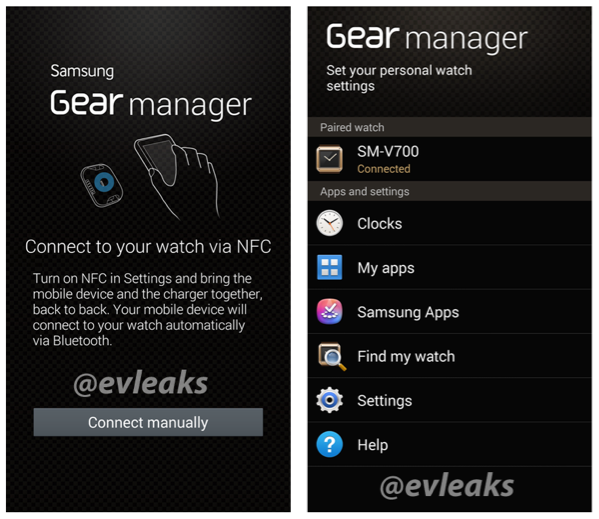
Samsung Gear Manager screenshots leak ahead of Galaxy Gear smartwatch launch

It is no secret that Samsung plans to introduce a smartwatch at its upcoming event at IFA. Ahead of the launch, prolific leaker of upcoming devices ie evleaks has posted screenshots of the application that will interface with the watch.
Screen Shot 2013-08-30 at 2.45.37 AM
The images confirm that the watch will be using NFC for pairing with smartphones but will also employ regular bluetooth based connectivity. The watch that is named SM-V700 will have a variety of apps including clock faces and several Samsung specific applications. A My Apps section can also be seen in the software but it remains to be seen what is included here. A find my watch function will presumably trigger an alarm and/or vibration feedback to help you locate your watch. We’ll be reporting live from IFA next week where we’ll have the complete low down on the Samsung Galaxy Gear, the Note III and all other devices announced. 

Micromax and Karbonn take top positions as the Indian Smartphone market surges ahead with the Phablet revolution


IDC-Indian-Smartphone-MarketShare-Q2-2013
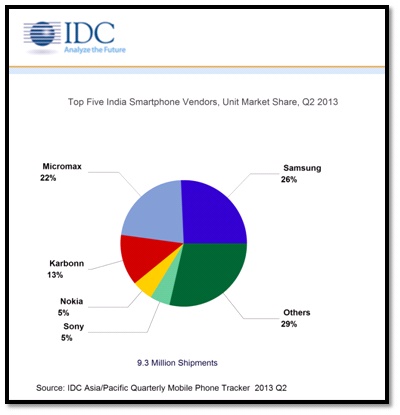
You might have seen us reporting on various marketshare reports each month coming from a company called IDC. Usually, the company provides a wider perspective of the global market for mobile phones as well as smartphones, but this time, they have focused on the second fastest growing mobile phone market in the world, India. We saw in June that the overall shipments of Smartphones in India was at just 6.1 million devices, but in a quarter, it has risen to 9.3 million shipments, according to IDC. And over half of the shipments were from local players like Micromax, Karbonn and the others, with the former taking the no. 2 and 3 positions of the Top 5 Smartphone vendors in the Indian market respectively.
IDC-Indian-Smartphone-MarketShare-Q2-2013-2
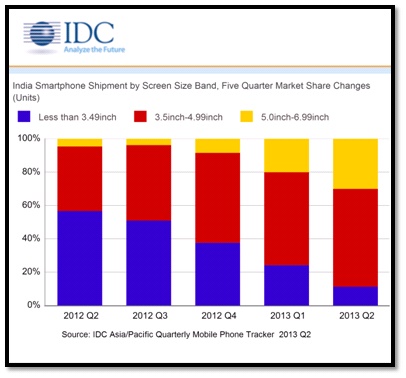
Micromax is now the no. 2 Smartphone player with 22% marketshare, just behind the market leader Samsung, at 26%. This amazing change is all thanks to the Phablet revolution in India, with >5 inch devices taking up more than 25% of the overall Smartphone sales. While Micromax has capitalized on the Phablet revolution, Karbonn has taken a similar, but even more aggressive approach, with high spec’d devices being offered at a comparatively lower price. Also, Samsung might have retained the lead with its own large screened devices in a wide range of prices and the best seller Galaxy Star, but the threat is clear.
The overall market volumes are currently low for Smartphones when compared to global trends, but the growth rate has been phenomenal, with companies like Micromax crossing 2 million devices in overall shipments. IDC says that the local players are the ones that have successfully transitioned from feature phones to Smartphones, like, for example, Celkon, Intex and Lava, apart from Karbonn and Micromax that is. This has left legacy players like Sony and Nokia to the 4th and 5th places in the market respectively, with 5% of the marketshare each. IDC also adds that Nokia has picked up, thanks to the Lumia 520 and is positioned for growth, while Sony has also picked up with competing EMI schemes and more dual SIM devices in the mid range price bracket.
Commenting on the growth, IDC says that it is clearly the mass volume-centric devices at the low end that has spurred the Smartphone’s rate of adoption. These devices, with large screens and Dual SIM functionality are the main contributors to growth, especially with really attractive price tags. But will this endure? What will the next year look like? Sound off in the comments section below!

LG Optimus G Pro vs Lenovo K900

LG Optimus G Pro was LG’s first Full HD phone which was announced way back in January but only recently launched. The Lenovo K900 was also announced in January and has been available since June in India.
g-pro-lenovo-k900-18
Both the phones are similar in the fact that both of them have a 5.5inch Full HD display. The internals are completely different with the G Pro being powered by a Snapdragon 600 Processor while the Lenovo K900 is powered by Intel Clover Trail dual-core processor.
Lets check out how these phones compete against each other.
Design, Build Quality
The LG Optimus G Pro has a solid glass front and back supported by a solid and heavy metal rim at the center. The Lenovo K900 has an all metal build with a rectangular slab design.
g-pro-lenovo-k900-17
The Optimus G Pro is shorter, less wide but considerably thicker than the Lenovo K900 despite the same 5.5inch display. It also weighs 10 grams more than the K900.
On the front of the phones, we have the display, above which we have the earpiece and front cameras along with ambient and proximity sensors on the right side on the G Pro, while the front camera is on the left side of the earpiece on the K900. The earpiece is present on the top edge on the G Pro.
g-pro-lenovo-k900-16
On the Optimus G Pro, we have a physical home button surrounded by LED light with capacitive touch keys on either side, but on the K900, there is no physical key, but all capacitive touch keys with a unique home icon.
g-pro-lenovo-k900-14
The positioning of keys are similar with only the power lock key on the right side on both the phones while on the K900, we have a microSIM card slot also.
g-pro-lenovo-k900-13
The bottom of Optimus G Pro has the micro USB port and the microphone while the K900 has a 3.5mm audio jack in addition to the microUSB port and microphone.
g-pro-lenovo-k900-10
On the left side, we have the volume rocker and the customizable Q-slide key on the G Pro while we have just the volume rocker on the K900.
g-pro-lenovo-k900-11
The top of Optimus G Pro has the 3.5mm audio jack, IR blaster and secondary microphone while there is nothing at the top of K900.
g-pro-lenovo-k900-12
Moving to the back side, we find a lot of difference in terms of design and materials used. On both the phones, there is a 13MP camera along with single LED flash in G Pro and dual LED flash in K900. The secondary microphone is right next to the camera on the K900.
g-pro-lenovo-k900-8
The Optimus G Pro has a removable battery cover and beneath the cover, we find a hot-swappable microSD card slot and microSIM slot.
g-pro-lenovo-k900-7
Overall, the LG Optimus G Pro and K900 have a good finish and solid build quality, but because of the glassy material the Optimus G Pro feels slightly slippery while the K900 feels quite solid because of the rectangular build, but its big footprint makes it tough to hold in the hand.
Display
Display is where things are similar with both the devices sporting a 5.5 inch Full HD display of 401ppi pixel density. The LG Optimus G Pro has a Tru IPS+ display while the K900 has a regular IPS display. Both the displays are sharp, crisp and have amazing colors. The Lenovo K900 has slightly better viewing angles and the colors are much truer in the K900 than on the G Pro. The G Pro seems to have higher brightness, but it looks slightly over-saturated and unreal when compared with K900.
g-pro-lenovo-k900-6
The Lenovo K900 has a slightly better display in terms of true color reproduction.
Hardware and Performance
The major differentiating factor between the two phones is the processor – LG Optimus G Pro is powered by a 1.7 GHz QuadCore Snapdragon 600 SoC, has 2GB RAM and Adreno 320 GPU while the Lenovo K900 is powered by a 2 GHz DualCore Intel Atom Z2580, has 2GB RAM and graphics are taken care by PowerVR SGX544 GPU.
g-pro-lenovo-k900-5
The Optimus G Pro has 16/32GB variants(we have the 16GB variant) while the K900 has just 16GB internal storage. Out of the 16GB, Optimus G Pro has 10.11 GB available while the Lenovo K900 has 4.68GB for apps out of which 1.17GB is available and 9.77GB user accessible memory. LG Optimus G Pro has a microSD card slot of expansion of storage which is missing in the K900.
g-pro-lenovo-k900-4
Out of 2GB in both the phones, the G Pro has around 1781MB usable RAM while the K900 has 1.9GB usable and G Pro has 1.2GB RAM free when the device is idle,but the K900 has just 1GB RAM free when the device is idle.
g-pro-lenovo-k900-3
The faster processor and more RAM give the LG Optimus G Pro a big upper hand in terms of performance. Both the phones are super fast and you would hardly notice the difference in day to day usage.
In benchmarks, the measure of performance could not be gauged as Optimus G Pro beat the K900 in few benchmarks like BaseMark X HD(OnScreen), GFX-Bench 2.7 T-Rex HD(OnScreen), LinPack(Single and Multi), Vellamo 2(HTML5) and Quadrant while the K900 beat the G Pro in AnTutu, Vellama 2(Metal), Sunspider Javascript, NenaMark 2 and Basemark X HD(Offscreen).
Camera
Both the phones have a 13MP camera at the back. The Optimus G Pro has a 2.1MP camera at the front while the K900 has a 2MP camera at the front. Both the phones can record 1080p videos at 30fps with stereo sound from both the cameras.
g-pro-lenovo-k900-9
The camera UI is different on both the phones with some skinning from the manufacturers. Both the phones have separate screens for photos and videos. The K900 has a lot of filters compared to the G Pro. Various shooting modes like HDR, Panorama are found in both the devices.
g-pro-lenovo-k900-2
In terms of image clarity, the Optimus G Pro was much better with less noise, more details, better contrast and true colors. Check out the video below to get a clear understanding of the camera qualities.

September 7, 2013

Gionee GPad G2 Review


gionee-gpad-g2-review-2
Gionee GPad G2 is the successor of the original GPad from Gionee that was launched in India back in May. The GPad 2 is considerably a big improvement over the original GPad with a better display, better processor, more RAM and better front facing camera. The Gionee GPad 2 falls into the mid-range phablet market in terms of pricing and features. Lets check out how it performs.
Box Contents
For a midrange device, the Gionee GPad 2 comes with a lot of stuff in the box. The various box contents include
  • Phone
  • Battery
  • 16GB microSD card
  • Flip cover with plastic back
  • Two Scratch guards
  • microUSB cable
  • USB Charger
  • 3.5mm Headphones
  • SIM eject tool
  • Documentation including service center list, manual and warranty card
gionee-gpad-g2-review-1
The Flip cover that is offered is of reasonably good quality. Usually, we find a single scratch guard with budget devices, but we were surprised to find two scratch guards that comes with the phone. The headphones that come with the phone are definitely not the best, but they get the job done.
Video Review
Design and Build Quality
Unlike other budget phones, the Gionee GPad 2 feels quite solid in the hand despite an all plastic build. The phone is quite solid and seems a little heavy because of the metal rim running across the device.
gionee-gpad-g2-review-16
In terms of dimensions, the GPad G2 feels big because of 5.3inch display and the not-so-thin bezels.
On the front of the phone, we have the 5.3inch display above which we have the earpiece. To the left of the earpiece, we have ambient and proximity sensor placed one above the other giving it a different look. To the right of the earpiece we have the 2MP front camera. The phone also has a Magnetic compass.
gionee-gpad-g2-review-5
Below the display, we have the capacitive touch keys for Home, Menu and back which lit up when pressed. The mouthpiece is present along the bottom edge.
gionee-gpad-g2-review-10
The positioning of keys is different from the other phones with the volume rocker on the right side.
gionee-gpad-g2-review-13
The microUSB slot is at the bottom of the phone.
gionee-gpad-g2-review-11
On the left side, we have the power lock key.
gionee-gpad-g2-review-14

On the top, we have the 3.5mm audio jack.
gionee-gpad-g2-review-12
Moving to the back of the phone, we find a very glossy back which is prone to fingerprints. The glossy plastic also makes the otherwise solid device slippery. There is the 8MP camera along with LED flash at the top left position and the speaker grill is present at bottom right position.
gionee-gpad-g2-review-7
Removing the battery cover, we find a huge 3000 mAh battery above which we have the microSIM and regular SIM card slot next to each other. The process of removing a microSIM is a little difficult and hence they have given a SIM ejection tool with the box. The hot swappable microSD card slot is present on the top right corner.
gionee-gpad-g2-review-9
Overall, the design feels a little played out and the reverse positioning of keys makes it a little confusing to use at first. Otherwise, the build quality is solid and the phone is quite sturdy.
Display
The Gionee GPad G2 comes with a 5.3inch qHD screen thereby having a pixel density of 207ppi which is slightly on the lesser side. When seen from a very close distance, pixels can be seen and this is a because of the low ppi. The display has a 5point multi-touch which is very good for the price. In terms of viewing angles, the display isn’t the upto the mark. Contrast begins to fade and we see a lot of whites. The brightness isn’t very high either. The positive thing about the display is that the colors are true when looked at from a straight angle.
gionee-gpad-g2-review-15
Overall, considering the pixel density, viewing angles, brightness, color reproduction, the display on the GPad G2 is average.
Hardware and Performance
Like most of the budget phablets in the price range, the Gionee GPad G2 is powered by a 1.2GHz quad-core processor from MediaTek – MT6589, has 1GB of RAM and the graphics are taken care by PowerVR SGX 544 GPU.
Gionee GPad G2 Memory and RAM
Out of the 1GB RAM, 976MB is usable and when the device is idle, about 635MB is free. The GPad G2 comes with 4GB internal storage out of which about 1GB is allocated for apps and remaining 1.74GB is user accessible.
Gionee GPad G2 Install Location and App to SD
There is also a microSD card slot and the phone comes preloaded with a 16GB microSD card. You can choose the preferred install location and also move the apps to the SD card.
In terms of performance, the device is not as smooth as we would have expected it to be. When you make your way through the default launcher, there is noticeable lag which can be annoying at times. There is a small delay in opening apps and switching between them.
In terms of benchmarks, the device performed on par with the competition. It scored 4049 in Quadrant, 49.2fps in NenaMark 2 and 12834 in AnTutu.
Camera
The Gionee GPad G2 comes with an 8MP rear camera with LED flash and a 2MP front facing camera. Both the cameras can record 720p HD videos and sadly there is no 1080p video recording.
The camera app is very minimal with just the basic features. On the left of the UI, we have three shooting modes – normal, HDR and face beauty. HDR enhances the contrast and brightness of an image while Face beauty smoothens out the skin in images. On the right side of the view finder, we have the Flash toggle and Front/Back camera toggle. To the right of it, we have the shortcut to the photos taken. Below it we have the camera and video shutter key. There is a settings toggle on the bottom right corner. Opening the settings menu, we have all the basic options like Effects, Moving to photo specific settings, we have options to set the image size till 8MP and set ISO from 100 to 400. There is also a video settings option which lets you set Time Lapse interval, enable sound in the videos, set video quality. You can swipe left from the viewfinder to goto the recently taken photos.
gionee-gpad-g2-review-6
Unlike other phones, there is no option to capture photos while recording videos.
In terms of image quality, the details are there and the colors are good, but there is a lot of noise. The images look when on the phone, but when looked at 100%, the noise is clearly visible. Low-light photography isn’t great either. Here are some camera samples.
The videos too disappoint as the maximum video resolution is 720p from both the cameras.
Gaming
The GPad G2 has a quad-core processor, 1GB RAM and PowerVR SGX 544 GPU to handle games on a qHD display. The device was able to handle small games quite easily, and even games like Need For Speed Most Wanted, Riptide GP2, Shadow Gun ran well on this device. The graphics were high and the game was reasonably smooth.
Considering the price of the device, the gaming performance is good.
Software
Gionee GPad G2 Homescreen and Android Version
The Gionee GPad G2 runs on Android 4.1.2 Jellybean with a layer of custom UI over it. The custom UI makes things little slow and sluggish. The notification bar resembles the ones seen in other mid-range phablets with various toggles. Other than the skinned UI, there isn’t much difference in terms of features.
Gionee GPad G2 Apps and Themes
Gionee has also given the option to use various themes for the UI and we liked the “Android UI” theme which brings a complete stock experience in terms of UI. Even the stock theme showed a bit of lag and sluggishness throughout the UI. In addition to theming, Gionee has given an app that lets users check for OTA updates. There are lots of preloaded apps like NQ Mobile Security, WeChat, WhatsApp, V5 Music and many other apps.
Battery and Connectivity
One of the positives about Gionee GPad G2 is its battery. The 3000mAh battery lasts really well and can get you through for nearly two days of moderate use. Despite heavy use, it lasts a day.
gionee-gpad-g2-review-3
Being a mid-range smartphone, it comes with a wide-range of connectivity features like 3G, WiFi, Bluetooth, GPS and microUSB. It has Dual SIM support (3G+2G) as well.
Conclusion
The Gionee GPad G2 is a decent mid-range phablet with very good specifications, but the sluggish software implementation pulls it back. For its current price tag of around Rs. 12,500, we are more than satisfied with the hardware, but we expect more smooth and stable UI and UX.
Pros
  • Good Build
  • Free flip cover and scratch guard
  • Good gaming performance
Cons
  • Heavy and bulky
  • Sluggish software
  • Average Camera

iBall Andi 4.7G Cobalt Benchmarks


iBall Andi 4.7G Cobalt Benchmarks
iBall launched the Andi 4.7G Cobalt last month at an MRP of Rs. 19995 and currently sells at a price tag of Rs. 17,990. We brought you the unboxing of the device earlier this week, here we have the benchmarks of the device. It has a 4.7-inch (f 1280 by 720 pixels) HD display at 312 PPI pixel density. It is powered by a 1.2 GHz quad-core MediaTek 6589 processor and runs on Android 4.2 (Jelly Bean). Let’s see how it competes with other quad-core smartphones in the Indian market.

Quadrant Benchmark
iBall Andi 4.7G Cobalt Quadrant
The Andi 4.7G manages to score 3963 points in the Quadrant benchmark.
AnTuTu Benchmark 3.3
iBall Andi 4.7G Cobalt AnTuTu 3.3
In the AnTuTu Benchmark 3.3, it scores over 13k
Vellamo 2 (HTML5)
iBall Andi 4.7G Cobalt Vellamo 2 HTML5
The Andi 4.7G scores 1471 points in the Vellamo 2 HTML5 browser benchmark
Vellamo 2.0 (Metal)
iBall Andi 4.7G Cobalt Vellamo 2 Metal
The Andi 4.7G hold the same second spot with 462 points even in the Vellamo 2 CPU subsystem performance test.
Linpack (Single Thread) 
iBall Andi 4.7G Cobalt Linpack Single Thread
It manages to clock 37 MFLOPS in the Linpack single thread benchmark.
Linpack (Multi-Thread)
iBall Andi 4.7G Cobalt Linpack Multi-Thread
In the Linpack multi-thread benchmark, it clocks 107 MFLOPS
NenaMark 2
iBall Andi 4.7G Cobalt NenaMark 2
In the NenaMark 2 it clock 44 fps similar to some quad-core devices
GFXBench 2.7 T-Rex HD (On Screen)
iBall Andi 4.7G Cobalt GFXBench 2.7 T-Rex OnScreen
It clocks 4.9 fps in the GFXBench 2.7 T-Rex
GFXBench 2.5 Egypt HD (On Screen)
iBall Andi 4.7G Cobalt GFXBench 2.5 Egypt Onscreen
The Andi 4.7G Cobalt clocks close to 5 fps in the GFXBench 2.5
Basemark X (On-screen) 
iBall Andi 4.7G Cobalt Basemark X OnScreen
Basemark X (Off-screen)
iBall Andi 4.7G Cobalt Basemark X Offscreen
It manages to clock 2.29 fps in the Basemark X Offscreen benchmark.